
Reader Bar
Reader Bar puts a slim bar across the top or bottom of your site that shows each reader the next step for their subscription. A new visitor is invited to subscribe, a subscriber whose card failed is asked to update it, and a reader whose subscription ended is invited back. Each reader only sees the message that fits them.
Requirements
- Leaky Paywall Pro. Reader Bar is included with Pro and only shows on your site while your Pro license is active.
- The Card failed state, and the Keep my subscription button in the Ending soon state, need the Recurring Payments extension. Keep my subscription is only offered to Stripe subscribers.
Turn it on
- Install and activate Leaky Paywall - Reader Bar.
- Go to Leaky Paywall > Settings > General > Reader Bar.
- Check Enable Reader Bar.
- Choose Bottom or Top for Position.
- Click Save Settings.
The bar works with the default messages straight away. Everything below is optional.
What each reader sees
Reader Bar picks one state for each reader. These are the defaults:
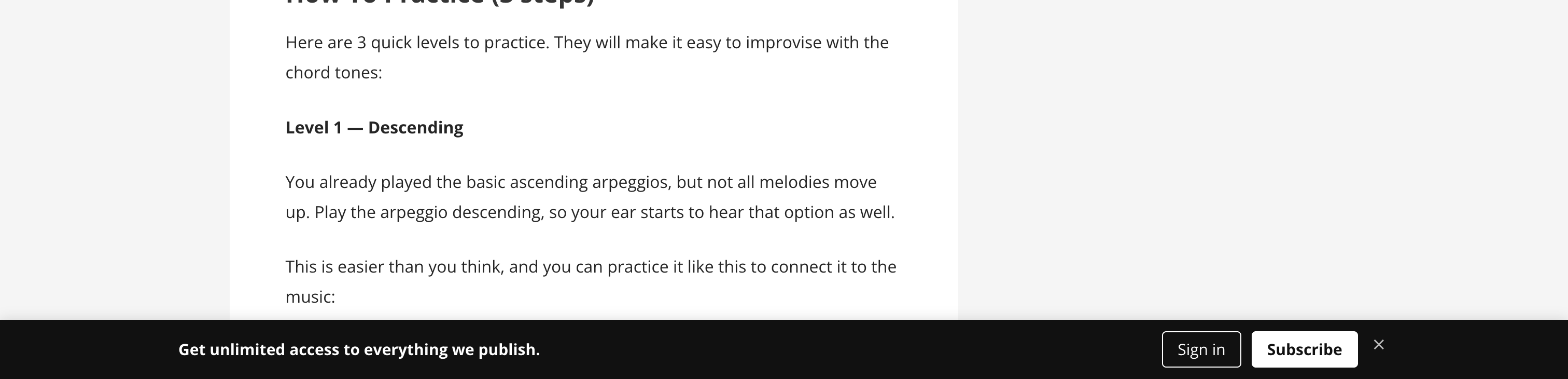
- Logged out: a new visitor. "Get unlimited access to everything we publish." with Sign in and Subscribe.
- Subscriber, logged out: a current subscriber who isn't signed in. "Sign in to keep reading." with Sign in, and no subscribe pitch.
- Lapsed, logged out: a former subscriber who isn't signed in. "Welcome back." with Sign in to restart.
- Free registered: "Upgrade your plan for full access" with Upgrade.
- Paid: a promotion for something they don't have yet, such as gift subscriptions or group plans when those extensions are active.
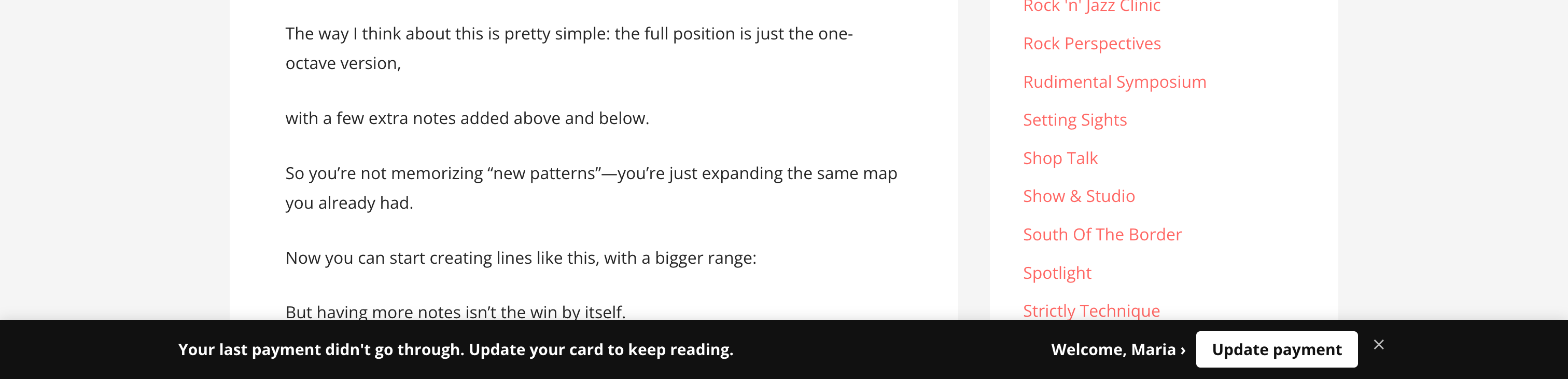
- Card failed: "Your last payment didn't go through. Update your card to keep reading." with Update payment.
- Ending soon: a subscriber who cancelled but still has access. "Your subscription ends" and the date, with Keep my subscription where the subscription can be resumed.
- Trial: "Your trial ends" and the date.
- Group member: someone on a Group Account or corporate subscription that someone else pays for. Just the greeting.
- Lapsed paid: a signed-in reader whose subscription ended. "Welcome back. Pick up where you left off." with Restart.
When Greeting is on, signed-in readers see "Welcome, Jane" as a link to their account page. A reader with no first name on file gets no greeting, and a My Account button instead.
Reader Bar recognizes readers who come back logged out because it remembers, in the reader's browser, whether they were a subscriber, a free reader, or lapsed. It does not store who they are.
Change the messages
Under Messages, each state has:
- A checkbox to show or hide the bar for that state.
- A message. Leave it blank to use the default.
- Link for above message. Leave it blank to use the default link: your subscribe page for sales messages, your login page for sign-in messages, and the account page for payment and trial messages.
- No link, to show the message as plain text.
In the Ending soon and Trial messages, {date} becomes the date the subscription or trial ends.
Under Button labels and Colors you can change the button text and the bar's background and text colors.
Messages by subscription level
Open Advanced: messages by subscription level to set a message for a specific level. For Paid and Free registered readers, a level message replaces the state message. Leave it blank to use the state message.
Other settings
- Free article count: show logged-out readers how many free articles they have left instead of the logged-out message. This only works when a metered restriction covers a whole post type.
- Dismiss for: how many days the bar stays hidden after a reader closes it. Enter 0 to hide it for the current page only. Card failed and Ending soon always come back after a day.
- Hide on pages: page IDs, separated by commas, where the bar should never show.
Where the bar doesn't show
- Your Leaky Paywall login, subscribe, register and My Account pages.
- When the paywall or the List Builder popup is showing, so readers don't see two pitches at once.
- When a Conditional Display Notice is showing to that reader.
If you use the free articles remaining counter, set Position to Top. The counter sits in the bottom corner of the page and covers the start of a bar at the bottom.
Caching
Reader Bar works on sites with full-page caching. Every visitor gets the same page, and the bar decides what to show in the reader's browser. Visitors with no subscription history don't cause any extra request to your server.
See how it's doing
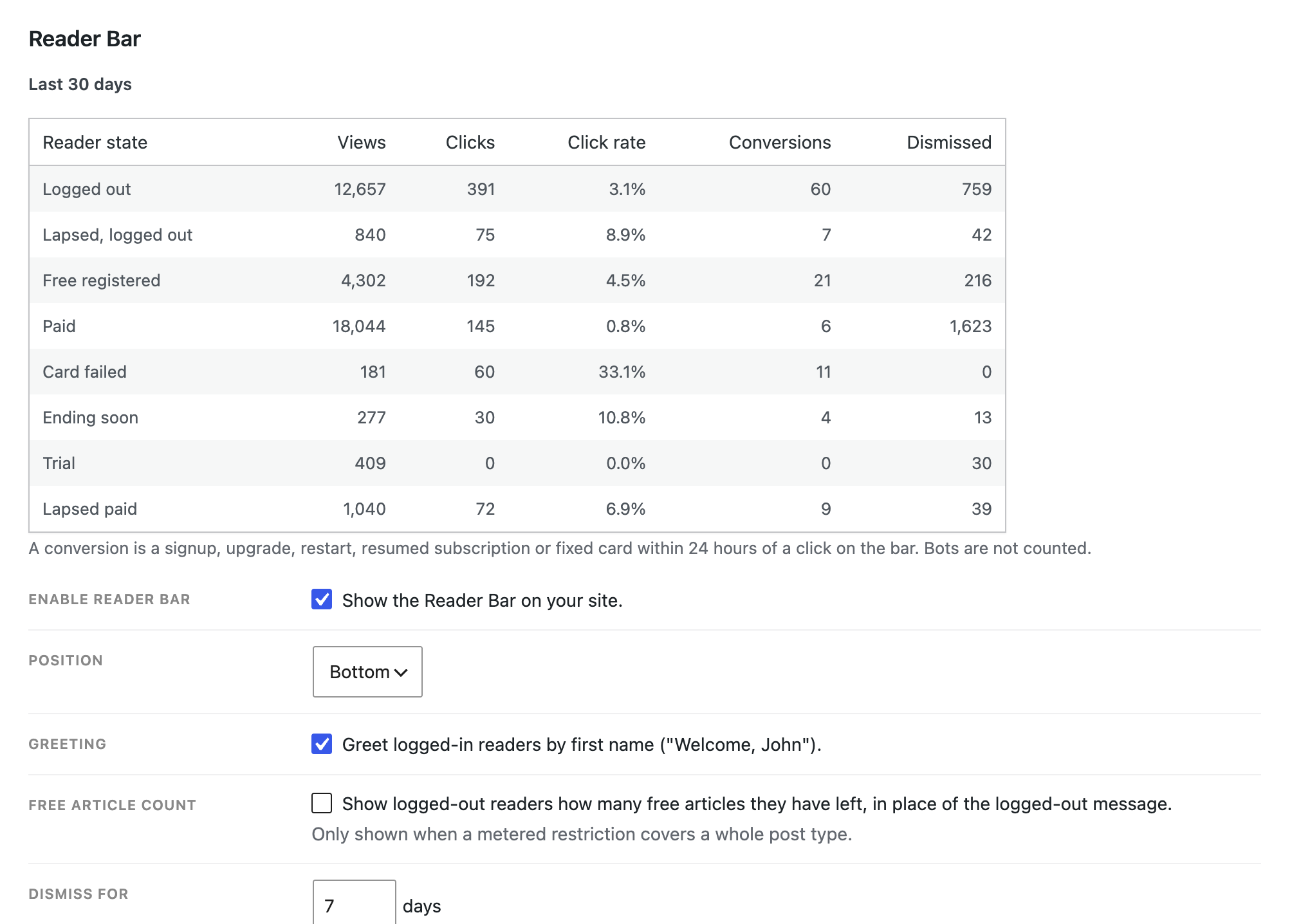
The top of the Reader Bar settings shows the last 30 days for each state: views, clicks, click rate, conversions and how often it was closed. A conversion is a signup, upgrade, restart, resumed subscription or fixed card within 24 hours of a click on the bar. Bots are not counted.
If you use Leaky Paywall Insights, clicks and conversions are also sent there as Reader Bar Clicked and Reader Bar Converted events.
For developers
leaky_paywall_reader_bar_stateandleaky_paywall_reader_bar_logged_out_state: change which state a reader is in.leaky_paywall_reader_bar_promos: change the messages offered for a state. The bar shows one per page view.leaky_paywall_reader_bar_payload: change everything the bar shows for a state.leaky_paywall_reader_bar_default_link: change where a message links when its link field is blank.leaky_paywall_reader_bar_is_suppressed: hide the bar on more pages.leaky_paywall_reader_bar_urgent_states: the states that come back after a day.
The bar sets a lp_rb cookie holding one word (paid, free or lapsed) so it can recognize a returning reader on a cached page. It holds no name, email or account ID and never grants access.